Thoughts on how to succesfully embed (social) software environments and social media used for collaboration and knowledge sharing, into daily work activities.
Embedding (social) software in daily work activities makes the cultural shift that is necessary possible and makes work more effective and efficient.
In Connections kun je kennis en ervaringen delen zonder e-mail. Hieronder staan een aantal toepassingen die je kunt inzetten waardoor je inbox een stuk leger en functioneler blijft.
Wat zijn de alternatieven voor samenwerken via e-mail?
Lees hieronder over de 5 alternatieven met gebruik van IBM Connections.
Forumdiscussies en vraag en antwoord via forums
Blog in plaats van E-mail
Wiki in plaats van E-mail
Bestanden delen in plaats van e-mail
Samenwerken in een activiteiten in plaats van e-mail
Forumdiscussies en vraag en antwoord via forums
Op dit moment wordt nog regelmatig gebruik gemaakt van e-mail om meningen over een onderwerp te inventariseren of over een onderwerp te discussiëren. Het nadeel is dat dit veel e-mailverkeer genereert en dat soms onduidelijk is wie op wie reageert.
Je kunt echter ook meningen inventariseren en een discussie voeren op een Forum binnen Connections. Elk onderwerp heeft een eigen discussie waarin alle meningen overzichtelijk getoond worden. Als het een openbare discussie is kunnen meerdere collega’s meedenken en meediscussiëren. Zo word je wellicht verrast door waardevolle informatie van een collega die je nog niet kende of van een collega waarvan je niet wist dat hij expertise heeft over het onderwerp.
Een Forum kun je toevoegen aan een community of je kunt een los forum maken in Connections.
Voordelen van Forum i.p.v. Mail
Een vraag stellen via een forum heeft als voordeel dat iedereen die hem leest en het antwoord weet hem kan beantwoorden. Je bent dan niet afhankelijk van de ene persoon die de mail ontvangen heeft. Als de persoon die de vraag per mail het antwoord niet weet, moet ie doorgestuurd worden en wellicht nog een aantal keren. Dan uiteindelijk wordt de vraag beantwoord en blijft het antwoord bij de vraagsteller. Het delen via een (openbaar) forum heeft als voordeel dat anderen, die wellicht een soortgelijke of identieke vraag hebben, niet opnieuw mailtjes naar afzonderlijke personen gestuurd worden, maar zij lezen zowel de vraag als het antwoord. Eventueel kunnen ze een aanvullende vraag stellen, of meerdere personen kunnen aanvullende antwoorden geven.
Discussies blijven zichtbaar en iedereen houdt het overzicht wie op welke opmerking heeft gereageerd. Conclusies kunnen na verloop van de digitale discussie getrokken worden en deze kunnen gepubliceerd worden.
Opgedane kennis gaat ook hier niet verloren.
FAQ opbouwen. In een forum kun je op natuurlijke wijze een FAQ opbouwen, zonder dat iemand alle informatie uit de e-mail moet verzamelen en dan opnieuw (na het maken van een of meerdere bestanden) per mail gedeeld wordt.
De vragen en antwoorden blijven zichtbaar voor iedereen, zolang het onderwerp actueel is.
TIPS
Houdt het forum wel actueel en schoon af en toe de discussies op door deze samen te vatten of conclusies te delen en de reacties te verwijderen.
De eigenaar van het Forum, kan de regie voeren en niet correcte antwoorden verwijderen.
Maak het forum openbaar, zodat zoveel mogelijk personen alle informatie kunnen lezen. Als iemand iets over een onderwerp zoekt, kunnen ze ook de nodige informatie vinden.
Blog in plaats van E-mail
Een blog is een pagina waarop iemand regelmatig korte stukjes schrijft, bijvoorbeeld over wat hij heeft meegemaakt. Of hij geeft er zijn mening/advies over een onderwerp binnen zijn expertisegebied. Wil je je expertise of ervaringen delen met een groep mensen, overweeg dan een blog te schrijven op Connections in plaats van een e-mail te sturen. Binnen een community in Connections kun je een blog ook gebruiken voor bijvoorbeeld een gespreksverslag of een update over het project.
Collega’s kunnen reageren op jouw blog-items (stukjes) en jij kunt jouw reactie plaatsen bij blog-items van anderen. Hierdoor krijg je wellicht nieuwe inzichten en ideeën.
Ook zijn Blogs zeer geschikt voor het plaatsen van mededelingen, nieuws-items, en nieuwsbrieven, tips & trucs.
Voordelen Blogs t.o.v. Mail
Informatie zoals nieuwtjes zijn tijds-onafhankelijk kunnen gelezen worden wanneer het voor de lezer actueel is, zonder dat de mailbox vol blijft stromen.
Gedeelde expertise over bepaalde onderwerpen zijn altijd te vinden voor iedereen die er in geïnteresseerd is. Je hoeft niet na te denken voor wie de informatie van belang is, die verantwoordelijkheid ligt bij de lezer en niet bij de zender.
Kennis blijft groeien door de aanvullingen/reacties van de lezers
Wiki in plaats van E-mail
Met een Wiki creëer je samen kennis. Als je samen met anderen aan informatie werkt die je niet hoeft op te leveren in een document (bijvoorbeeld Word of Excel), dan kun je ervoor kiezen om te werken in online Wiki-pagina’s. Deze workshop is ook gemaakt in een Wiki!
Voordelen van informatie in een Wiki
Niemand hoeft bestanden eerst te downloaden om ze te kunnen lezen: de pagina kun je direct lezen!
Niemand hoeft bestanden offline te bewerken en de wijzigingen weer te uploaden als nieuwe versie. Een Wiki maakt vanzelf een nieuwe versie na elke wijziging.
Je hebt zelfs de mogelijkheid versies met elkaar te vergelijken en versies terug te zetten of te verwijderen.
Elk lid kan een eigen Wiki-pagina maken waardoor elk lid bijvoorbeeld aan één hoofdstuk kan werken. Deze kunnen later met links aan elkaar verbonden worden.
Van alle wijzigingen worden automatisch versies bijgehouden. Wanneer er fouten zijn gemaakt bij een wijziging kun je deze eenvoudig herstellen door een eerdere versie terug te plaatsen.
Zoals bij alle tools in Connections, kun je een Wiki toevoegen aan een Community of een losse Wiki maken en delen met collega’s. De informatie in je Wiki is dan alleen toegankelijk voor die collega’s.
Je kunt relevante tags toevoegen per pagina waardoor je de informatie goed vindbaar maakt.
Bestanden delen in plaats van e-mail
Werk je samen met collega's aan informatie die je moet opleveren in een Word- of Excel-document, dan worden de bestanden vaak over en weer gemaild. Zo kan er snel een versie-chaos ontstaan, waarbij de laatste informatie vaak alleen in een mailbox of in de eigen bestanden op de pc beschikbaar is, en (nog) niet voor de rest van de organisatie. Zo zou het kunnen gebeuren dat verschillende collega's binnen je organisatie aan dezelfde informatie werken, zonder dat ze dat van elkaar weten.
Wanneer je een bestand deelt in Connections (in Bestanden of in Bestanden in een Community) en deze met Tags goed vindbaar maakt, wordt de informatie toegankelijk voor anderen. Dan kunnen collega's deze bekijken, downloaden, en aanbevelen. Ook kunnen ze er vragen over stellen of commentaar geven door een reactie te plaatsen. Iedereen die het bestand in Connections mag wijzigen, kan de wijzigingen als nieuwe versie uploaden. Zo beschikt iedereen altijd over de meest recente versie.
Samenwerken in een activiteiten in plaats van e-mail
Een activiteit is uitermate geschikt om taken toe te wijzen en de voortgang van werkzaamheden te volgen. Bijvoorbeeld bij de volgende werkzaamheden is een Activiteit daarom een goed alternatief voor e-mail:
het organiseren van een event
het doorlopen van een installatieprocedure
het schrijven van een project-document
het proces voor het maken en versturen van een nieuwsbrief
samenwerken aan een uitgebreid document
Alle taken en informatie komen dan op één plek samen en staan niet langer verspreid over verschillende e-mails.
Onderdelen van een activiteit:
Secties: waarmee je de structuur van de activiteit kunt bepalen; bijvoorbeeld een project onderverdelen in fasen en binnen elke fase taken (actiepunten) toewijzen.
Items: bevatten informatie over een onderwerp in het betreffende onderdeel (sectie) van de activiteit.
Actiepunten: kun je toekennen aan personen (met einddatum) en kunnen worden afgevinkt door degene die de activiteit heeft toegewezen gekregen en door de eigenaar. Eigen actiepunten kun je in je IBM Notes agenda tonen.
Reageren op en aanvullen van items en actiepunten.
Zoals bij alle samenwerk middelen binnen Connections kun je een Activiteit toevoegen aan een Community of je kunt een losse Activiteit maken
One of the key objectives of implementing a social business software tool is to help employees share knowledge and expertise.
I just stumbled upon a great tiny feature that will allow me to search my company's collective knowledge, right from my browser!
Social business software lets you find relevant and valued information
Often, without a social business tool, employees of different departments or countries are often re-inventing the wheel. Because they don not have the tool to work openly (share what they do and why) there is no way of finding information by colleagues that could be very useful to them.
Maybe these colleagues have done something similar or have been confronted with a similar challenge or issue. Maybe someone wrote exactly that kind of report or made a presentation you could re-use. Yet, without social software in place, how could you learn from them? How would you find that information? Or even know if the information is out there?
So they Google, to see if the internet can provide an answer.
Not that I don't like Google. It ususally helps me find things fast and good. BUT, there is also a lot o junk to go through. Google finds relevant stuff, but cannot put value on the content. How do I know if this information is up to date? Can I trust the source? Is it applicabe to our company?
When you're searching the web, in general, it takes a lot of time to find the gems, the truely useful information, vaued by my peers. How do I filter out the mass of information?
In comes the social business tool ...
Why not search within my company instead? Why not first try to find what my colleagues have found before me on this big internet? Find what my colleagues before me found useful, and saved in the tool, maybe even with comments, tips, and context (what project/issue/client they used it for). Find what our own matter experts have written down before. And be able to find the colleague behind the shared information to see their background in their Profile, to assess it's value, and possibly to get in touch if I need to know more.
What usually happens though
I see it time and again. There is a social software tool available, but our first instinct whenever we need to find information is to use Google search again. Not using the collective intelligence available in the company, waisting a lot of time searching and filtering.
Adding IBM Connections
search to your browser
I just stumbled upon this tiny feature when reading the IBM Connections Knowledge Center wiki:
Add IBM® Connections to the list of search engines used by your web browser so that you can search IBM Connections content directly from the browser.
When following the instructions for your browser (IE, Firefox, Chrome) provided in the article you will get your Connections search added to your bwoser search bar.
It's really easy to get Connections added to your Firefox search bar:
Open the search page of your company's IBM Connections environment: .../search/web/jsp/advancedSearch.jsp
Click on the arrow in your Search toolbar
Click Add Connections
Wouldn't it be cool if we would have all employees' webbrowsers fitted with this Connections search instead of Google? I'm curious as to what would happen. Awareness? Confusion? Irritation? Joy?
For now, I'm putting this knowledge in our Connections platform.
I've been really looking forward to working with Kudos Boards, a visual, personalised and intuitive display of IBM Connections Activities. The past months I've tested the pre-releases, and on June 11th there was the announcement that Kudos Boards is now ready to go!
Kudos Boards offers Activities users a better way of getting your work organised.
Kanban style
I like the Kanban board style presentation of IBM Connections Activities. A Kanban board is used quite frequently in projects, but can be usefull for other purposes as well. The Kanban board shows steps in a process or list visually as cards.
There are some key principles for a Kanban Board:
Visualize workflow Cards make the workflow clearer.
Limit work-in-progress Visualisation and workflow immediately shows what still needs to be done, thus gets done !
Pull work from column to column Easily drag and drop cards to move tasks through the workflow process.
Kudos Boards 'fixes' some issues with Activities
Long lists of Activities When employees are using a lot of Activities, it gets hard to track which ones are most important. The only options you have to view your list, is by date or by priority. No personal views or ways to sort.
Content in Activities can become very long lists| Often all the content in an Activity doesn't fit on the page, and it is hard to see all the content at a glance.
Adding or editing content requires a lot of clicking To add an entry or todo, or to edit one, takes a few clicks, and content requires a lot of room.
Moving sections, entries or Todo's can be hard When using drag-and-drop employees need to have a very steady hand, and even then, moving can go terribly wrong!
Real-time views not possible Content edited/added by multiple employees working in an Activity at the same time isn't displayed instantly. Employees need to refresh the page first before changes made by others are visible to all.
No way of drilling down to specific content in an Activity Sometimes you don't want to see all the content in an Activity, but just some that is relevant to you, or to you at a certain time or in a specific context. Activity content can not be filtered in any way.
What do Kanban Boards offer?
When you use the Kanban Boards view in IBM Conenctions Activities you get a much more visual way of working. Visualization is more than just another look&feel. It actually helps you recognizing things, allowing you to get to what you need faster, and easier.
It's not just another way of displaying Activities. On top of the visual display come some new features: Board categoriesand color coding, which in turn allow you to filter your Activities list or content in an Activity. Using Board categories and filters makes it possible to view the Activity much more to your personal preferences.
Some great advantages of Kudos Boards
Activities overview
When viewing you Boards, instead of Activities list:
Visual display of your Activities as tiles.
Tile colors to visually display different types of Activities.
Board categories to categorize Activities. Allowing you to filter your Activities by a category.
Pin Boards, and easily view your pinned boards (like favourites).
Within a specific Activity
Simply drag-and-drop cards, which moves them through sections, or within a section.
One-click editing of the Board settings. No more searching through Activity menus.
One-click editing of entries or todos, in a visual info card that easliy fits the screen.
One-click to add a new entry or todo.
Card colors to categorize entries and todos , allowing you to filter on specific colors.
Filter Lists. A list is the same as a section, and with Kudos Boards you can filter to display specific sections (lists) only.
Real-time work in progress! Boards are synced automatically. Showing other people's work instantly!
I've worked with Kudos Boards for a while now, and I really love them!
I've also created some Activities / Kudos Boards templates that will help organisations get going fast:
Meeting
Sales pipeline
Product development
Organising an event
Creating a newsletter
Personal Getting Things Done system
Pomodori technique
All templates work on IBM Connections Activities, but really come to live with Kudos Boards, using the visual tiles and cards display, the color categories and Board categories, and filtering options.
Sinds 16 mei 2014 is de IBM Connections mobiele app versie 4.7.0. uitgekomen.
Nieuw in versie 4.7.0 van de IBM Connections mobile app is Coachmarks.
Coachmarks, is een nieuwe functie, die voorzietin een contexthandleidingvan nieuwe functiesals je voor het eerstinlogt opeen account.
Coachmarks is een instructionale overlay voor apps. Door coachmarks in
te zeten kun je gebruikers wat tips geven over bijvoorbeeld nieuwe
functionaliteit, door instructies op het scherm te geven in de
daadwerkelijke app. Coachmarks zijn handig. Ze geven de gebruiker net
een zetje in de juiste richting. Zie het als een kleine visuele
aansporing om nieuwe dingen te ontdekken.
Korte handige tips
Het is algemeen bekend dat gebruikers uitgebreide handleidingen niet
lezen. Ze willen gewoon snel aan de slag, zonder eerst de UI te moeten
aanleren. Dit is de paradox van de actieve gebruiker:
die wil in zo'n kort mogelijk tijdsbestek en met zo min mogelijk
inspanning, effectief geavanceerde functionaliteit leren gebruiken. De
paradox zit hem in het feit dat juist het leren van en het correct
gebruiken van deze geavanceerde functionaliteit de gebruiker nu juist
tijd zal besparen!
De kunst van goede coachmarks is dat je niet teveel instructie geeft.
Omdat je niet de overlay kunt lezen en tegelijkertijd de app gebruiken,
zul je de hint of tip moeten onthouden, om dezelater toe te passen. Het
korte-termijn geheugen kan niet heel veel onthouden, en de informatie
zal na 20 seconden vervagen. Wanneer je de tips ook alleen geeft daar
waar de gebruiker zich op een bepaald moment (voor de eerste keer)
bevindt (in de context van het werk), en deze kort houdt, dan zal de
coachmark het meest effectief zijn.
Coachmarks zijn dus geen uitgebreide handleiding, waarin je alles gaat
uitleggen, maar korte tips die binnen een bepaalde context gegeven
worden. Ze zijn daarom uitermate geschikt voor het tonen van 'What's
new' informatie van apps.
Impressie van Coachmarks voor Connections Mobile app versie 4.7.0:
With the current available tools in IBM Connections and some add-ons like Connections Content Manager (CCM) and IBM Docs, collaboration can really take a productivity flight!
Often clients wonder what tools they should be getting. When do we use Files, or should we use the CCM Libraries? What can we do with a Wiki? When is IBM Docs interesting? I tell them, it all depends on the business goals the organization has, or what collaboration needs their employees have to get their work done faster, more efficient and more efficient.
Talking about productivity… what are the productivity gains of new ways of collaborating with IBM Connections Files, Wikis, or IBM Docs versus old ways (file hares and email attachments)? Comparing collaboration methods efficiency
Imagine you are collaborating on a piece of information with 3 others and you need to review each other’s work before you can finalize it.
What are the differences in using the different tools from a productivity perspective?
Collaborating on a file sent as email attachment
Let’s do a quick test:
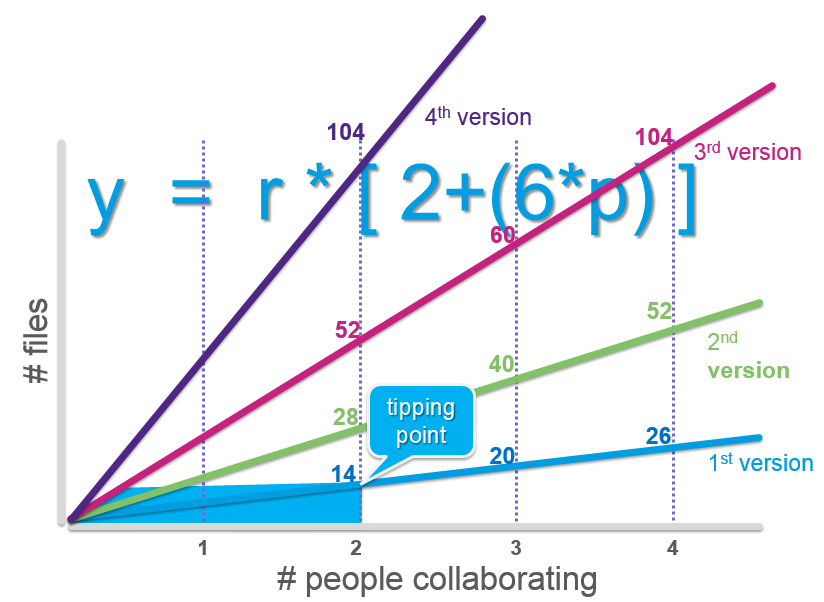
How many files (copies) will you get when collaborating through e-mail with 3 others and 2 revision rounds?
a. 4
b. 10
c. 12
d. 52 Tip: remember you need to save, send and receive copies every time a review is done.
Before you take a peek at the correct answer below, let me elaborate:
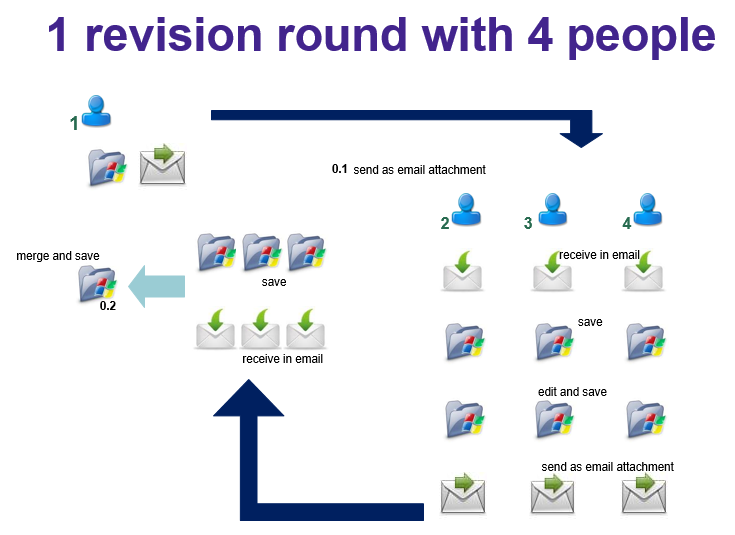
Collaborating on a file requires creating it, saving it to a folder, and sending it as an attachment in an email. Then the receivers get an email with the attachment, which they save in a folder, then start editing the file, and save it again (either as a new version copy, or overwrite the old one), then send it back through their email. The original creator gets 3 emails with attachments, and saves these to a folder, then needs to merge them into one new copy manually skipping through the contents. And for the second review round we repeat the whole process again!
Now for the answer: it’s 52 !
And this is why:
I could also work it out like this, try it for yourself by writing down each and every step. Count all the copies for all the steps in the process of working on a file and sending it through email: remember there is a file saved in a folder, a file send in an email, a file received in an email in every step by every person!
It becomes apparent that collaborating together on information through email attachments is not very efficient. In fact you could say the tipping point for effective email collaboration is with 2 people and only one revision round:
How can collaboration using Files, Wikis or IBM Docs improve efficiency so that employees can be more productive?
You could look at efficiency in the collaboration process: the total time spent: how much effort and time does it take to work together, and what is the turnaround (the time spent for a whole process of collaboration). Collaborating using IBM Connections Files
With Files there are the following productivity gains:
Collaborating in one central place, with only one version and everyone can work with the latest version.
To prevent making changes at the same time people can lock the file before they edit it, and then unlock it for the next person to start their editing.
Every reviewer can see the work done by the previous one, so there are no duplicate efforts, and no merging is necessary
Apart from collaboration in the file (edit it), people can also use comments. Comments can be questions, tips or remarks about the content, instead of changing the content. Sometimes you want to give advice but not change the file itself.
Every reviewer can see the comments made by others so there are no duplicate efforts.
The owner of the file can easily take the comments and make changes to the file accordingly, without having to undo changes in the file, or remove the MS Word style comments.
Comments in Files remain, unlike comments in a Word file, after the file is finalized.
It’s easy to see all the different versions, and the owner can revert to an older version or even restore it.
All this together makes the total time spent on the file by the 4 people a lot less, and because there is no need to await emails with the changes the turnover is also much less. Collaborating using an IBM Connections Wiki
If we would use a Wiki to do the same collaboration, there would even be more productivity gain, especially in turnover time.
Next to the automatic versioning, and comments Wikis allow people to work on their own peace of the puzzle, simultaneously, because each can work on their own pages, and afterwards a structure for the whole can be formed through wiki links and peer and child pages movement.
Another great thing about using a Wiki for documentation that is continuously updated, is that in order to change parts of the information only that particular page needs to be updates, and not the whole document as with a file). And it is immediately clear to readers which page was updated. Collaborating using IBM Docs
Using IBM Docs for true co-creation of a file will result in the following productivity gains, on top of those with using IBM Connections Files: almost no turnover time.
True co-creation can occur, because all reviewers can work in the same file at the same time, resulting in almost no turnover time. It’s like sitting in the same room all writing on the whiteboard at the same time. There is no waiting on each other’s work, and on top of that the reviewers can communicate about their work using chat. Fantastic collaboration analogy
Compare collaborating on a file in a sequential way - as with Email attachments – with collaborating on a file simultaneously – as with IBM Docs - with this analogy.
Musicians that each play an instrument in a song each record their part separately and sequential in a studio and finally it is all merged into a song. But suppose they would all play their instrument together. I mean, not as a band live show, but REALLY together:
Watch this: Walk of the Earth playing Gotye ‘s Somebody that I used to know.
Recently I received Michael Sampson's new book 'Doing business with IBM Connections 4.5'. Being a huge fan of his previous work I had been awaiting with much anticipation the arrival of it ever since it was announced even before Connect 2013 in february this year. If you are going to embark on a social busines journey using IBM Connections this is a MUST read! In fact, if you are embarking on a social business journey with any kind of social software this book will give you guidance on a practical approach for improving business processes through collaboration scenarios. The book is set up with 10 chapters on collaboration scenarios. Each scenario comes with 2 Case Studies from organizations having implemented IBM Connections, showing their experience in that particular scenario. From the 20 case studies no less than 5 are from the Netherlands! These are from Silverside, Saxion (both on managing meetings), Forbo Eurocol (Sharing Team updates), LeasePlan (Finding Expertise), Sasja Beerendonk e-office (Individual Coherence). Yes indeed, that last case study would be me :-) 5 out of 20 case studies, now that is quite impressive for such a tiny country!
We meet a lot, especially the larger organizations often have a genuine meeting culture. There's nothing wrong with that in itself, but is that 'meeting time' actually used efficiently? Are we making efficient use of our time and schedule when we actually sit together in a room? And when we meet, are we making effective use of software resources that support meetings? This article will get you an idea of how you could use Activities in IBM Connections to make meetings more efficient and effective. If you would like to discuss this more, I invite you to join me and Marion Vrielink to come join us in our IBM Connect 2013 session BOF106 Using Actvities to Manage Meetings on Tue, 29/Jan 06:30 PM - 07:30 PM at Macaw 2.
Meetings At a meeting people come together where interaction and communication are the main means to achieve common objectives. Interaction and communication are the key collaboration methods. We come together and discuss or debate vigorously. We come to decisions and action points (tasks, todo's) are set. The question now is, is this collaborating efficiently and effectively? The answer is usually 'no'. Many people I talk to complain about too many and ineffective meetings. The next question is: what can we do to effectively meet?
Top annoyances Have a look yourself on the internet for the top annoyances of meetings. Chances are that when you Google you get a list like this:
ringing telephones
email during meeting
arriving too late
unprepared / documentation not read / outdated versions of documents
meetings last longer than scheduled
no clear agenda
actions from earlier meeting not done
no decisions being made
tedious
not the right people
Some of these annoyances can be overcome with good agreements and good abidance. But there are other organizational and behavioral aspects that can be tackled otherwise. An example is that the meeting is lasting longer than scheduled. This of course may be a consequence of other annoyances, such as not reading the meeting documents or lengthy discussions.
What if we meet differently? What if we define a meeting not as the time and place where new topics are being brought to the agenda and where questions about the content are done. But what if we define a meeting as the moment of coming together to just make decisions and set actions. Or as a time where new output or innovation starts, which then is elaborated on at other times. This way meetings will be more than just a moment of getting together. Work is done prior to the meeting and afterwards, by each individual on their own schedule and only on that part important to them - thus the meeting itself can be more productive.
Supporting resources When a meeting is used only for coming together to decide, prior to the meeting some collaboration has to be done. By using online and social resources, attendees can discuss and ask questions prior to the meeting take place. We could use forums for lenghty, and expected discussion. Or we could use commenting on files and blogs for simple questions and interaction. And meetings can also be supported with realtime resources, such as IBM Sametime Chat, Sametime Online Meeting, video conferencing, or IBM Connections Activities.
Email and Calendar: good for scheduling, not for collaboration It is very common for organizations to mainly use Email and Calendar to support the process of meeting. A Calendar is a great tool for scheduling the meeting. But these tools are less suitable for discussing documents or assigning agenda items to certain people and setting tasks. Email and Calendar are not suitable for managing documents in the context or for making minutes.
Email and Calendar: information lock-down A disadvantage of all the information in a Calendar invitation is that this information is only available for the attendees who have accepted. When someone initially declined the meeting, then this person does not have all the information. When a new team member or attendee is added, all the previous correspondence in email needs to be sent again. A disadvantage of sending all information by email is that the replies given by all attendees can lead to conversation chaos and when files are edited and routed through email there is a version chaos as well!
The issues with email collaboration are common: where can I find the latest version of the meeting minutes? Where can I find detailed information on the meeting? How can a new team member find all previous information and decisions? To solve these issues requires more structure. IBM Connections Activities can provide this structure.
Meeting with IBM Connections Activities Activities in Connections, lets you organize tasks. And a meeting could be such an activity. Connections Activities even lets you create a template which everyone in the organization may use to easily create the appropriate structure to organize a meeting. The structure may of course slightly differ for individual situations, or your organization may have different needs as to how to structure the activity. But this will give you a general idea. Each organizer can adjust the template to their specific meeting objectives and requirements. You can edit content, delete and add.
Every meeting usually has an Agenda with several (sometimes recurring) topics. Usually the agenda is provided in a Word document. But the agenda can very well be an item in your activity. You may choose to have an activity with multiple meeting dates where these are defined as a section (i.e. section 15-02-2013), or create an activity for each seperate meeting. This depends on whether the meeting takes place regularly (every week, every month) with a fairly solid team, or if it is a single complex meeting such as organizing a special three day event.
Share, communicate and discussprior to the meeting When the agenda is addes as items to the meeting section, attendees can collaborate prior to the meeting. To each topic you can add text, but also links and files. In addition, colleagues can be notified (e-mail message or message in the Connections Activity Stream) of new items or tasks.Action items are tasks. These allow you to assign a task to all members of the activity (a group task) or to a specific colleague. When the action items are assigned to a colleague with a specific date, this colleague can easily keep up with the todo's by using the To Do list view in IBM Connections, or simply add them as a calendar overlay in their Lotus Notes calendar.
Meeting time becomes a moment for decision making and setting out new tasks During the meeting, any decisions made can be added to a desicions section. That way there will always be an overview of all decisions, no matter what meeting date it was made. Any new tasks decided upon during the meeting, can be easily added to the Activity, where they will show up in the Action items view in the Activity, for all to see and keep track of. When the Agenda is covered in items in the Activity, then making minutes is really pointless. Because during the meeting action items and decisions can be added, the Activity itself becomes the minutes. As I mentioned earlier, this is a possible structure of a meeting template in Connections. In a blog of Alan Hamilton a slightly different approach is used. The idea remains the same. e-office work for adoption of IBM Connections regularly with the application of Activities for meetings to actually use in the flow of work to get. This scenario-based approach has proven very effective. Download these slides that once the design schematic and step-by-step display.
If you would like to see more and discuss the possibilities of using Activities to meet efficiently, come join me and Marion Vrielink at IBM Connect 2013 'BOF106 Using Actvities to Manage Meetings' Tuesday from 6.30-7.30 pm at Macaw 2.
I am so happy today! It might be a little self indulging but here it goes none the less.
You may have heard this song by The Commodores (or Lionel Richie) 'Three times a lady' ?
That's what I'm singing to myself all day today.
Why?
After already having been approved to be a speaker at IBM Connect 2013 in the beginning of december 2012, I today got a confirmation e-mail from IBM that both my Birds of a Feather sessions submitted have been approved as well!
So I am feeling like 'once, twice, three times a lady'.
Birds of a Feather sessions (BOF)
A Connect 2013 BOF is a relaxed, interactive discussion, with no media or AV. This is a 'chalk-talk' style meeting, and the purpose of the discussion is to gather input, feedback, and learn from each other. I will be the facilitator of the discussion. All attending get the opportunity to become engaged. This is not a 'one to many' session.
These are the 3 sessions I will be doing coming january:
BP304 Become a Social Business: Leverage User Adoption Through GamificationSasja Beerendonk, e-office January 29, 16.15 - 17.15 Swan Pelican
User adoption is key to success when implementing social software within your
organization. When confronted with social software, employees often find
themselves clueless about how to get started, because it requires a different
work manner, behaviour and attitude. Step-by-step gamification guides employees
into the right direction and takes them to a higher level of understanding and
usage. This session covers topics such as: What is gamification? Is it suitable
for my organization? What motivates people? From "Maslow’s Need" to "Pink’s
Drive", you'll understand the basic concepts of motivation that gamification
uses. I will also show a demo on gamification for IBM Connections and the metrics
used to measure and stimulate desired behaviour.
BOF106 Using Actvities to Manage MeetingsSasja Beerendonk, e-office; Marion Vrielink, Saxion
One of the challenges for social software adoption is that employees need guidance in understanding how to embed IBM Connections in their daily work routine. Often people say they do not have time to blog, or dont know what they should be sharing. Dealing with these kinds of roadblocks is what user-adoption is all about. Come to this BOF to learn how we dealt with these challenges!
BOF108 Metrics That Matter. Insight to Employee EngagementSasja Beerendonk, e-office
It is generally perceived that in social networks only 1% of people are actively participating by creating content, 9% is contributing by recommending and commenting and 90% is just 'lurking'. Commonly referred to as the 90-9-1 rule. But is this really true for social software in the enterprise? Discuss if this rule shouldn't apply to your Connections user group, and how to measure engagement by user type (creator, contributor, joiner) using the metrics provided in Connections. Metrics provide numbers and graphs that tell you about the usage of Connections. Numbers in itself are meaningless. So what are the right questions to ask to provide meaningful insight ?
Ofcourse I am hoping you will join me in one (or all!) of my sessions. If you have any wishes, or feedback up front, feel free to leave a comment here or send me a message of some sort.
Another great Social Connections event full with brilliant speakers from all over the world has taken place this November 30th in Amsterdam. Social Connections IV had more attendees than ever (200) and was packed with three tracks of presentations by IBM'ers, business partners and customers solely about social business with IBM Connections.
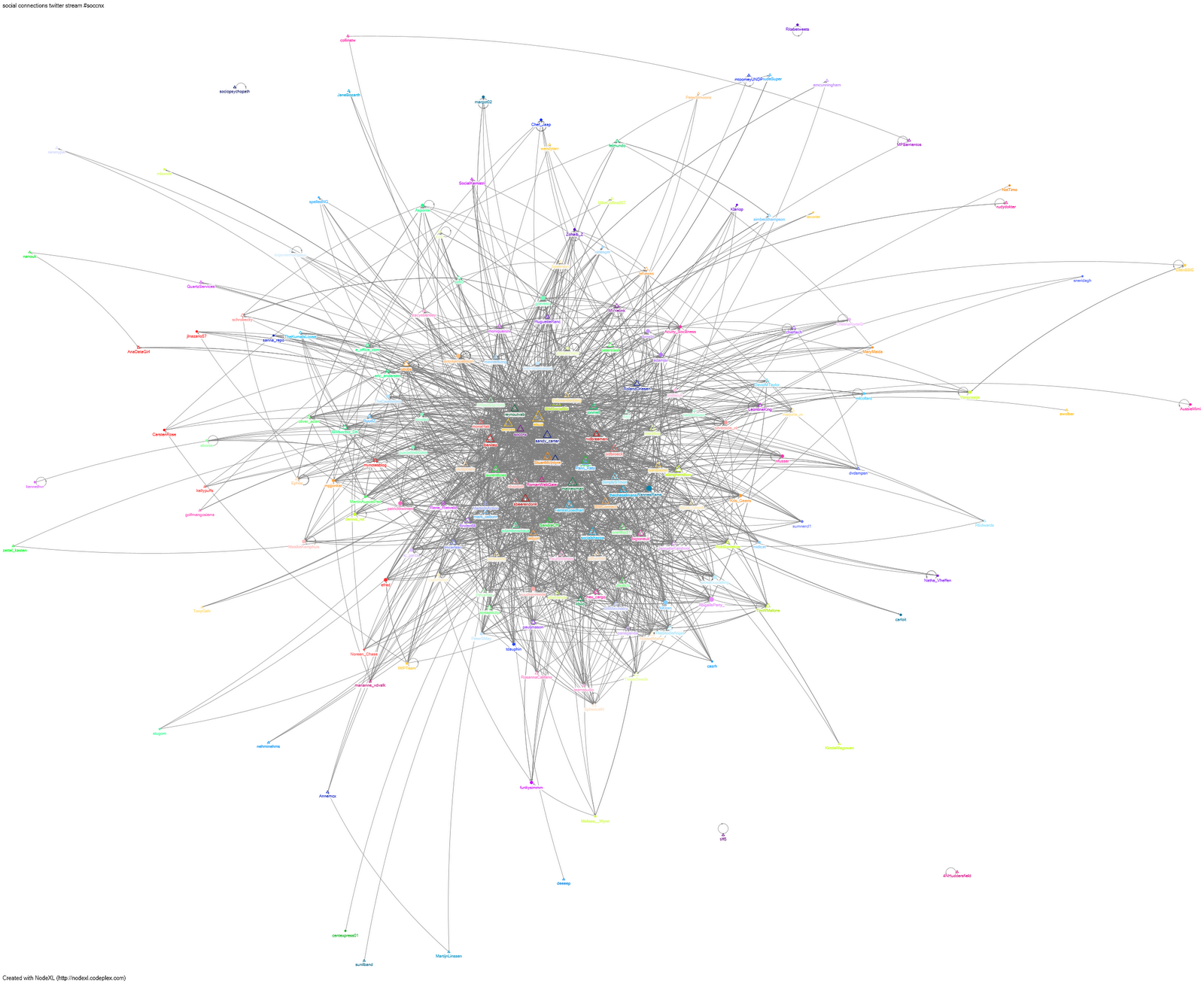
As usual there is quite a bit of tweeting going on during an event, and Social Connections is no exception. The hashtag for the event is #soccnx. Doing some network analysis delivers a great graph of the Social Connections IV community. The graph displays all the connections between attendees (and even non-attendees) that have tweeted #soccnx.
Graph of #soccnx twitter network during Social Connections IV
Social Connections community is tightly connected
The graph is compiled of 210 vertices (nodes) and 4010 edges (links). These are the twitter accounts and their connections to eachother. The average geodesic distance is 2,113666 and the maximum still only 4 - meaning that the Social Connections community is a tightly connected community. On average every person is only two links away and the maximum is 4 degrees of separation. So even less than the famous (unproven) theory 6 degrees of separation. Just exactly how close everybody involved is to one another is also apparent from the number of connected components: there are only 5 'subgraphs' of tweeters that are connected to each other but not to anyone in one of the other subgraphs.
When digging deeper into the table underlying the graph I can give some insight in various types of measures of the centrality of a vertex within a graph that determine the relative importance of a vertex within the graph
(devided into degree, closeness centrality, betweenness centrality, eigenvector centrality and PageRank).
Top 20 vertices (tweeters) by Eigenvector Centrality
The top names are not surprising. They are the ones organising the event, speakers, IBM employees or very influential people in the IBM social business arena.
Use Word and its full formatting features to share information in IBM Connections Blogs
Have you tried the IBM Connections toolbar in Microsoft Word? It allows you to work efficiently on Word documents, yet publish your information easily online in you IBM Connections environment. And I'm not just talking about adding it to your Files or to Community Files. Yes, it can do that too. But you can even post your Word document to a Blog, attach it to a Wiki or add it as an item in an Activity! I am particularly happy with the functionality to actually transform your Word document to a Blog entry, as it might help people to start using Blogs more.
There are two adoption hurdles to using Blogs that I encounter regularly:
1.The old habit to put information in a file
2.The limitations of the IBM Connections Blog editor
The old habit to put information in a file
One of the hardest habits to kill is for people to create information in Word documents. I've written about this before in blog posts and created a whitepaper even back in 2010 (dutch) Omzeil het gebruik van mappen en bestanden. Over Wiki's en het werken in de 21e eeuw. Employees automatically revert back to putting texts into Word documents, that they then save on a computer drive in a folder of their choice. In itself, of course, there is nothing wrong with creating Word documents. Word can prove to be a useful tool when information needs excessive formatting, such as table of contents, headings, page numbers, headers and footers, embedded images, tables or graphs. Especially when the document needs to be preserved in a specific system for archiving or compliancy, for advanced workflows or for sharing with others outside the organization, a Word file may be the appropriate way of creating information.
There is a down-side though to using Word documents, in a social environment such as IBM Connections. Social software provides many ways of sharing and collaborating on information that might prove to be better. Better how and why? Any information in a file requires extra steps to get to the content itself. Information in a Word document is accessible to me only after clicking it and opening it in Word. Other tools, such as a Blog or a Wiki give instant access to the content itself. I don't need an extra click, nor a program to open it.
As far as I am concerned Connections social tools such as Blogs and Wikis are more appropriate to create and share content when:
the content does not require advanced Microsoft Word formatting functions
the content is for internal use only (not to be sent to others outside the organisation)
the content needs co-authoring (Wiki) or commenting (Blog)
The limitations of the IBM Connections Blog editor
The IBM Connections plugin for Word brings all the Word functionality within IBM Connections Blogs. Many people are struggling with the Blogs editor in IBM Connections. It's not easy to use, people are not familiar with it and you can't create your content offline. Using Word instead brings the familiar functionality into Connections, allowing you to create your content offline as well to save it to Connections later.
The IBM Connections toolbar
Whenever you feel like posting your Word document to Connections, it provides several options for you to choose to get your Word document online through the Save & Send menu:
How can you save a Word document as a Blog entry in IBM Connections?
Basically you need to take these easy steps below, or watch the video demo (also embedded at the bottom):
1.Make sure you install the IBM Connections plugin, which will give you the IBM Connections toolbar:
2.Start a new Word Blog post document
Go to File – New – Choose Blog post
3.Create your Blog post content
4.Save & Send the document to Connections
5.Go to File – Save & Send – Send to IBM Connections – Choose Send to Blogs