Thoughts on how to succesfully embed (social) software environments and social media used for collaboration and knowledge sharing, into daily work activities.
Embedding (social) software in daily work activities makes the cultural shift that is necessary possible and makes work more effective and efficient.
It is quite common to hear customers or partners speak about their social business adoption strategy. Ranging from advertorials to true inspiring personal anecdotes, however interesting they are, these are always limited to just one point of view or just one's experience.
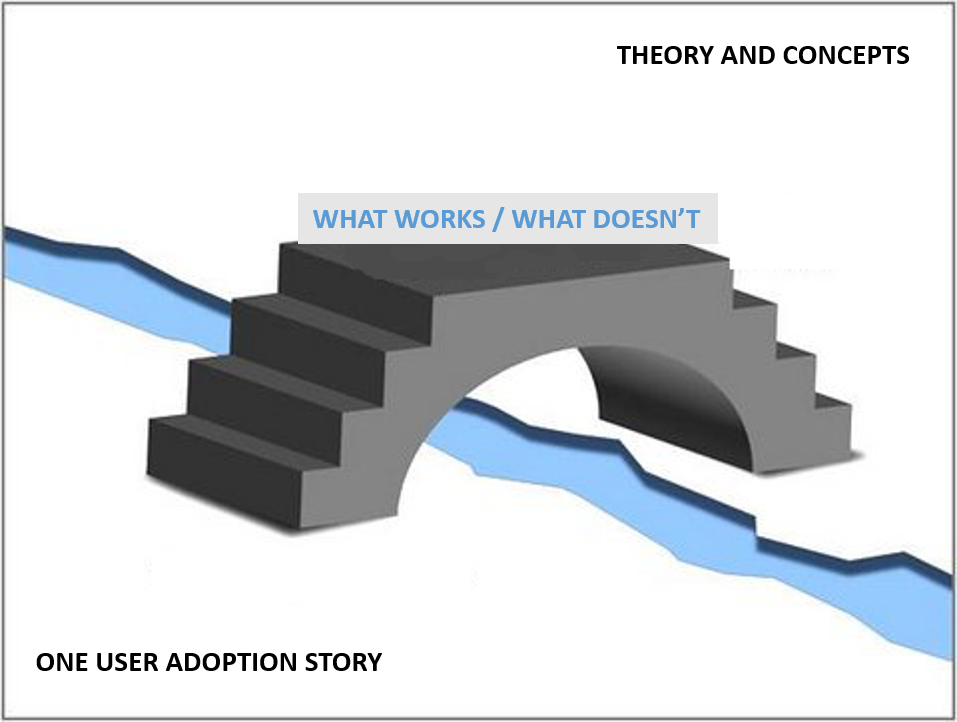
Then there are the theoretical books, whitepapers and presentations by user adoption or social business gurus. Based on scientific research or developed concepts they provide us with a good base to come up with user adoption strategies that make sense. But what if we do not want to hear just one's experience, or trust theory alone, but want to get insight into what works and what doesn't work for many others?
There seems to be a gap there.
Bridging the gap
What is missing is a good combination of the two: aligning many stories with a solid foundation in research.
Don't believe us, believe them!
Silverside interviewed 32 people from over 22 different organisations about their social business journey. We gathered a lot of insight aboutnew waysofworking (together)and knowledgesharing in a social business. Then we took the insights gathered about from these interviews and aligned them with prevalent theoretical concepts, such as Micheal Sampson's User Adoption Strategies, Roger's adoption curve, Simon Sinek's Start with Why, Cialdini's Influence, BJ Fogg's Behaviour Model, Daniel Pink's Drive, Stephen Covey's 7 habits of highy effective people - and the 8th habit, Maslow's Hierarchy of Needs, Insights Discovery and Carl Jung's personality types, and David Allen's Getting Things Done.
Business novel
What do you get when you analyse this pile of interviews and distil the essence of these organisations' experiences? A business novel (Samen schieten op resultaat), based on 2 concepts: A story about a fictional organisation called 'Target BV' in the style of 'The hero's journey' by Joseph Campbell. This makes the theoretical concepts and all the stories a pleasant read. Unfortunately at present the novel is only available in Dutch.
Presenting at IBM ConnectED
But you get a chance to hear about our insights into user adoption strategies! Femke Goedhart and I are presenting at IBM ConnectED 2015, a session in the
Best Practices track, BP202
Beyond Theory: Trials and Tribulations in Becoming a Successful Social Business. We will present to you a mix of strategies to find the essence ofsocial business adoption. Not just strategies that worked, but also some that didn't work! Because there is so much to learn from both success and struggles!
You can register for IBM ConnectED 2015, on january 25-28, in Orlando Florida.
http://www.ibm.com/software/collaboration/events/connected/
Find our session and add it to your calendar in the session planner.
With the current available tools in IBM Connections and some add-ons like Connections Content Manager (CCM) and IBM Docs, collaboration can really take a productivity flight!
Often clients wonder what tools they should be getting. When do we use Files, or should we use the CCM Libraries? What can we do with a Wiki? When is IBM Docs interesting? I tell them, it all depends on the business goals the organization has, or what collaboration needs their employees have to get their work done faster, more efficient and more efficient.
Talking about productivity… what are the productivity gains of new ways of collaborating with IBM Connections Files, Wikis, or IBM Docs versus old ways (file hares and email attachments)? Comparing collaboration methods efficiency
Imagine you are collaborating on a piece of information with 3 others and you need to review each other’s work before you can finalize it.
What are the differences in using the different tools from a productivity perspective?
Collaborating on a file sent as email attachment
Let’s do a quick test:
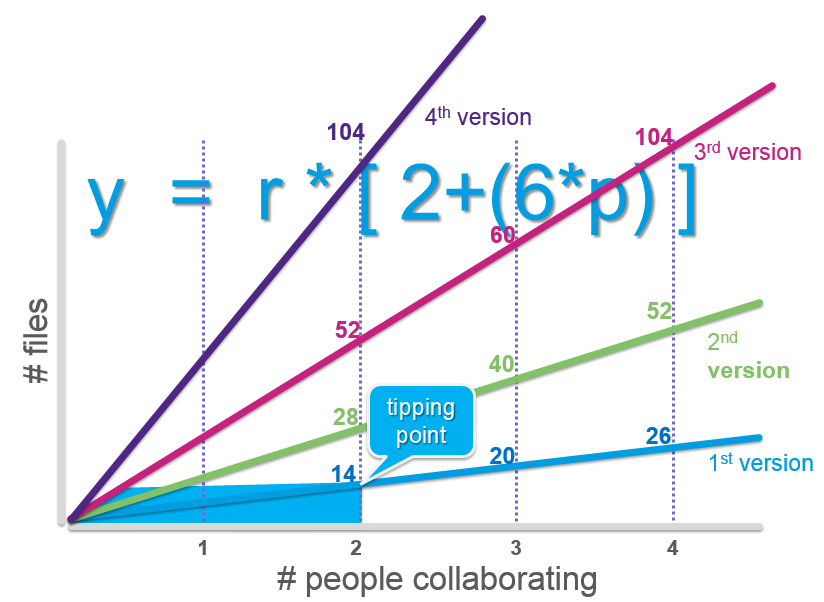
How many files (copies) will you get when collaborating through e-mail with 3 others and 2 revision rounds?
a. 4
b. 10
c. 12
d. 52 Tip: remember you need to save, send and receive copies every time a review is done.
Before you take a peek at the correct answer below, let me elaborate:
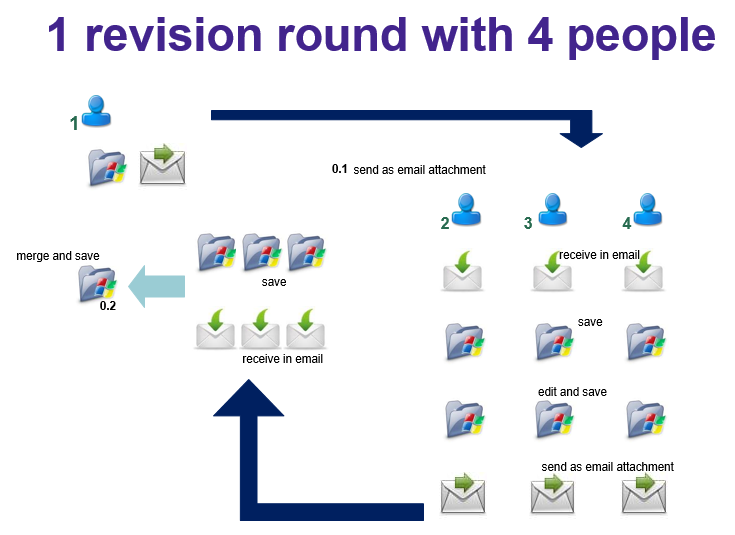
Collaborating on a file requires creating it, saving it to a folder, and sending it as an attachment in an email. Then the receivers get an email with the attachment, which they save in a folder, then start editing the file, and save it again (either as a new version copy, or overwrite the old one), then send it back through their email. The original creator gets 3 emails with attachments, and saves these to a folder, then needs to merge them into one new copy manually skipping through the contents. And for the second review round we repeat the whole process again!
Now for the answer: it’s 52 !
And this is why:
I could also work it out like this, try it for yourself by writing down each and every step. Count all the copies for all the steps in the process of working on a file and sending it through email: remember there is a file saved in a folder, a file send in an email, a file received in an email in every step by every person!
It becomes apparent that collaborating together on information through email attachments is not very efficient. In fact you could say the tipping point for effective email collaboration is with 2 people and only one revision round:
How can collaboration using Files, Wikis or IBM Docs improve efficiency so that employees can be more productive?
You could look at efficiency in the collaboration process: the total time spent: how much effort and time does it take to work together, and what is the turnaround (the time spent for a whole process of collaboration). Collaborating using IBM Connections Files
With Files there are the following productivity gains:
Collaborating in one central place, with only one version and everyone can work with the latest version.
To prevent making changes at the same time people can lock the file before they edit it, and then unlock it for the next person to start their editing.
Every reviewer can see the work done by the previous one, so there are no duplicate efforts, and no merging is necessary
Apart from collaboration in the file (edit it), people can also use comments. Comments can be questions, tips or remarks about the content, instead of changing the content. Sometimes you want to give advice but not change the file itself.
Every reviewer can see the comments made by others so there are no duplicate efforts.
The owner of the file can easily take the comments and make changes to the file accordingly, without having to undo changes in the file, or remove the MS Word style comments.
Comments in Files remain, unlike comments in a Word file, after the file is finalized.
It’s easy to see all the different versions, and the owner can revert to an older version or even restore it.
All this together makes the total time spent on the file by the 4 people a lot less, and because there is no need to await emails with the changes the turnover is also much less. Collaborating using an IBM Connections Wiki
If we would use a Wiki to do the same collaboration, there would even be more productivity gain, especially in turnover time.
Next to the automatic versioning, and comments Wikis allow people to work on their own peace of the puzzle, simultaneously, because each can work on their own pages, and afterwards a structure for the whole can be formed through wiki links and peer and child pages movement.
Another great thing about using a Wiki for documentation that is continuously updated, is that in order to change parts of the information only that particular page needs to be updates, and not the whole document as with a file). And it is immediately clear to readers which page was updated. Collaborating using IBM Docs
Using IBM Docs for true co-creation of a file will result in the following productivity gains, on top of those with using IBM Connections Files: almost no turnover time.
True co-creation can occur, because all reviewers can work in the same file at the same time, resulting in almost no turnover time. It’s like sitting in the same room all writing on the whiteboard at the same time. There is no waiting on each other’s work, and on top of that the reviewers can communicate about their work using chat. Fantastic collaboration analogy
Compare collaborating on a file in a sequential way - as with Email attachments – with collaborating on a file simultaneously – as with IBM Docs - with this analogy.
Musicians that each play an instrument in a song each record their part separately and sequential in a studio and finally it is all merged into a song. But suppose they would all play their instrument together. I mean, not as a band live show, but REALLY together:
Watch this: Walk of the Earth playing Gotye ‘s Somebody that I used to know.
Recently I received Michael Sampson's new book 'Doing business with IBM Connections 4.5'. Being a huge fan of his previous work I had been awaiting with much anticipation the arrival of it ever since it was announced even before Connect 2013 in february this year. If you are going to embark on a social busines journey using IBM Connections this is a MUST read! In fact, if you are embarking on a social business journey with any kind of social software this book will give you guidance on a practical approach for improving business processes through collaboration scenarios. The book is set up with 10 chapters on collaboration scenarios. Each scenario comes with 2 Case Studies from organizations having implemented IBM Connections, showing their experience in that particular scenario. From the 20 case studies no less than 5 are from the Netherlands! These are from Silverside, Saxion (both on managing meetings), Forbo Eurocol (Sharing Team updates), LeasePlan (Finding Expertise), Sasja Beerendonk e-office (Individual Coherence). Yes indeed, that last case study would be me :-) 5 out of 20 case studies, now that is quite impressive for such a tiny country!
This year will be my first time actually attending IBM Connect. That in itself is exciting enough, but I am not just attending some great sessions, but I am a speaker as well. I've been doing sessions at several other events before, but this is something different completely!
The last month has been a very busy month, with mailing and socializing on all kinds of platforms with several people from IBM. From mails about the technical preparations to stern yet funny emails from my track manager Susan Bulloch, I've been in awe with the tight scheduling and organizing and information flow coming to me. There have been so many people assisting and answering questions so swiftly, it's amazing.
Ofcourse the thrill for me started when my session BP304 Become a Social Business: Leverage User Adoption Through Gamification was approved early december. That's when things really became hectic with creating the presentation, and filling in all sorts of forms and ofcourse scheduling flights and hotels.
I've been eager to see what other sessions would be listed. Now they are all known and I'm even more excited! You can check them out yourself, for example by downloading The totally unofficial and totally unsupported IBM Connect session database Mat Newman provided for us, which now is available in a mobile version too! There are some really great speakers and sessions on all kinds of topics. The topic I am speaking about (gamification) has some more interesting sessions:
Growing a Smarter Workforce through Social Gaming
Using Gamification to Ignite the Widespread Adoption of IBM Connections
Social CMO: Engaging the Consumer
The wednesday Keynote by Jane McGonigal
So if you are interested in the topic of gamification and adoption, go see any of these, or mine.
Today I joined a webinar about Vivastream. This is the tool used for IBM Connect 2013 which allows speakers and attendees to interact in a great way. I hope to speak to you there soon. I will also get you involved before they start, on two BOF sessions I am doing:
BOF106 Using Actvities to Manage Meetings (together with Marion Vrielink, Saxion University) Tuesday 6.30-7.30 pm in Macaw 2
BOF108 Metrics That Matter. Insight to Employee Engagement Wednesday 7.00-8.00 am in Macaw 1
The Vivastream for Connect will allow us to do polls and contact each other So you can expect to get some polls for the above mentioned BOF sessions! I invite you to join me in the interaction!
Today is the day that we will be migrating our e-office Connections environment to IBM Connections 4. Allthough still only in beta, for us it is critical we experience quickly what possibilities it offers for us as IBM Premier business partner.
Testing mail integration and Activity Stream
We can't wait to test drive mail integration, and to start working with the Activity Stream API. Lots of suitable Domino applications are available to integrate, such as timesheets notifications. So we can enter those Tinstantly through the embedded experience the Activity Stream will provide.
At a loss without it
In the meantime, I'm sort of at a loss, as Connections for me is where I do most of my daily work activities. It's my connection to what's going on at the office while I am at clients or working from home. It's how I organize information that I want to store for later reading or for processing work later. Connections is where I keep my colleagues informed of what I am doing. If I need help or want to communicate I use Connections. Projects are organized into Activities, and I use Activities as my GTD tool.
Hopefully the homepage will soon display something else: